Checked
Water bill portal and account changes in Guelph, Ontario
Guelph, Ontario, Canada
Use Guelph’s Water Bill Portal to view your bill and balance, manage pre-authorized payments and choose e-billing. Create a profile with a valid email, then link the water account using Add Account.
Key information
Use Guelph’s Water Bill Portal to view your bill and balance, manage pre-authorized payments and choose e-billing. Create a profile with a valid email, then link the water account using Add Account.
On this page
Set up the water account view at a glance
- Have the current water bill available so you can find its
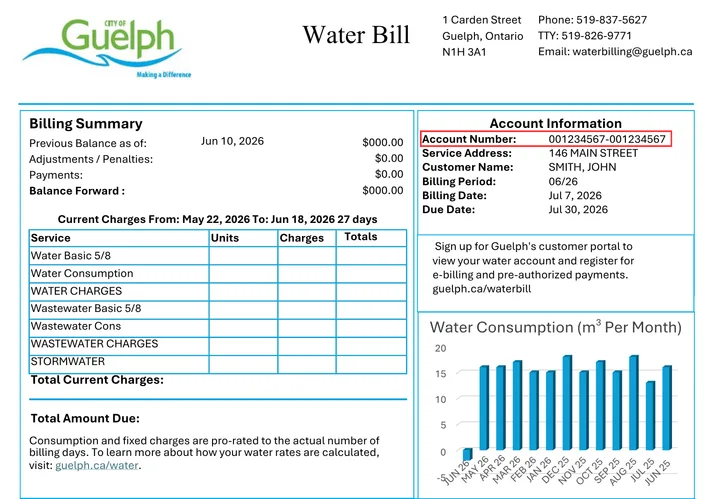
Have the current water bill available so you can find its account number using the city’s sample bill.
- Create or sign in to your portal profile
Create or sign in to your portal profile. If you already have a Property Tax Portal profile, use the same email for the Water Bill Portal.
- Choose Add Account and link the water account number
Choose Add Account and link the water account number. After linking, view the balance and manage the supported billing preferences.
Sources: Water and wastewater billing
Set up the water account view
- Have the current water bill available so you can find its account number using the city’s sample bill.
- Create or sign in to your portal profile. If you already have a Property Tax Portal profile, use the same email for the Water Bill Portal.
- Choose Add Account and link the water account number. After linking, view the balance and manage the supported billing preferences.
Sources: Water and wastewater billing
Choose the right account task
| Task | Where to start |
|---|---|
| View bill or balance | Linked water account in portal |
| Start, change or cancel automatic payment | Pre-authorized payment option |
| Electronic bills | E-billing option |
| Change contact information | Contact-information request on city page |
| Move into or out of an address | Move In or Move Out Request |
Sources: Water and wastewater billing
Account help and policy limits
Contact Water Billing at 519-837-5627 or waterbilling@guelph.ca for an account question. The city page links profile instructions, bill inserts and the sample bill for locating the account number.
A profile and a linked account are different steps. Creating an email profile alone does not attach a property bill. Use Add Account for the correct water account.
This guide explains portal and change requests. It does not calculate a water bill, establish a payment-due-date extension or promise leak credit; those are separate billing policies.
Sources: Water and wastewater billing
Questions and answers
What do I need to create a portal profile?
A valid email address.
Source: Water and wastewater billing
Should I create a different email for water and property tax?
No. The city says use the same email if you already have a Property Tax Portal profile.
Source: Water and wastewater billing
Does making a profile automatically show my water bill?
No. Link the water account number with Add Account.
Source: Water and wastewater billing
Where can I find the account number?
Use the current bill and the city’s sample-bill illustration.
Source: Water and wastewater billing
Can the portal show my outstanding balance?
Yes. Viewing the bill and account balance is a listed function.
Source: Water and wastewater billing
Can I start automatic payments there?
Yes. The portal can start, change or cancel pre-authorized payment plans.
Source: Water and wastewater billing
Can I choose paperless bills?
Yes. E-billing signup is listed in the portal.
Source: Water and wastewater billing
How do I report a move?
Use the city page’s Move In or Move Out Request rather than only changing portal email.
Source: Water and wastewater billing
Where can I update contact details?
Use the linked Change Your Contact Information request.
Source: Water and wastewater billing
Who can help if my account will not link?
Water Billing at 519-837-5627 or waterbilling@guelph.ca.
Source: Water and wastewater billing
Sources: Water and wastewater billing